
}
Many EGLOBAL Mini PC users are blocked by the TPM 2.0 hardware requirement when upgrading to Windows 11. Don’t worry—with a custom image and Rufus, you can bypass this restriction without complex commands, even if you’re a beginner.
Download the TPM 2.0-bypassed Windows 11 image (Link ①), https://drive.google.com/file/d/1TggAJiSBMq4YFiqtCCD6l1L0Nw__yvwf/view?usp=sharing
Which automatically skips the TPM check during installation. You may also use the latest official Windows 11 file (Link ②) https://drive.google.com/file/d/1VbjzGecVvxQTLAKMZBjvTtH5nCQsySZI/view?usp=sharingas an alternative.
Video Tutorial: Language Settings During System Installation:
https://drive.google.com/file/d/1evmSxMxbD3mJZTXE83k4qvVmQvCAvQSY/view?usp=sharing
Prepare a USB drive of 8GB or larger, and back up its data first.
Open Rufus and configure as shown in the screenshot:
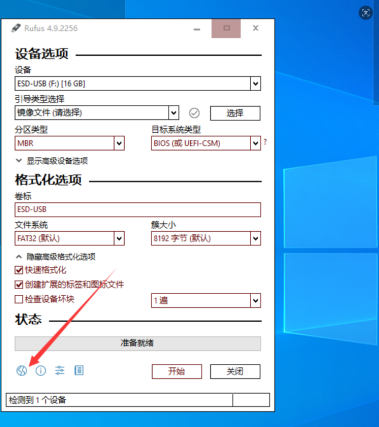
· Device: Select your USB drive (e.g., 16GB ESD-USB)
· Boot Selection: Import the downloaded Windows 11 image
· Partition Scheme / Target System: For legacy BIOS mode, choose MBR + BIOS (or UEFI-CSM)
· Format Options: Keep default settings and check "Quick Format"
· Critical Step: Click the settings icon pointed by the arrow, then enable the "Bypass TPM 2.0 check" option Click "Start" and wait for the process to complete.
Insert the USB drive into your EGLOBAL Mini PC. Press F2/Del during boot to enter the BIOS, then set the USB drive as the first boot device. Reboot to enter the Windows 11 setup, confirm the TPM 2.0 bypass, and follow the wizard to complete partitioning and system configuration.
Contact: EGSMTPC
Phone: +86 13418881073
Tel: +86 13418881073
E-mail: coral@eglobaltech.cn
Add: 16D, QUANZHI Science & Technology Building, Maozhoushan Industrial Park, Hou Ting Community, Sha Jing Street, Bao'an District, Shenzhen, 518104 China