
}
Many corporate buyers and industrial clients of EGLOBAL Mini PCs need customized serial numbers and UUID for equipment asset management, which can be permanently written into motherboard BIOS via the DMIEDITx64 utility under Windows OS.
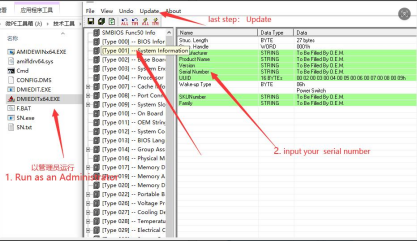
First, locate the DMIEDITx64 executable inside the tool folder and right-click to launch it with Administrator privileges.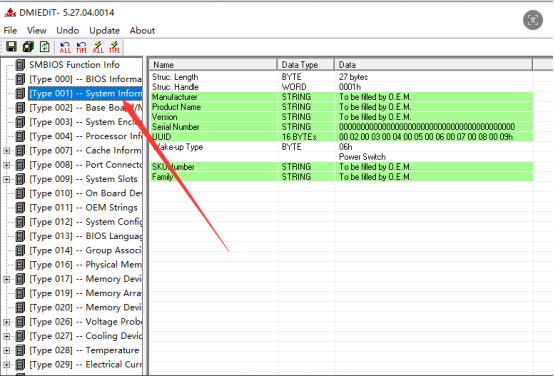
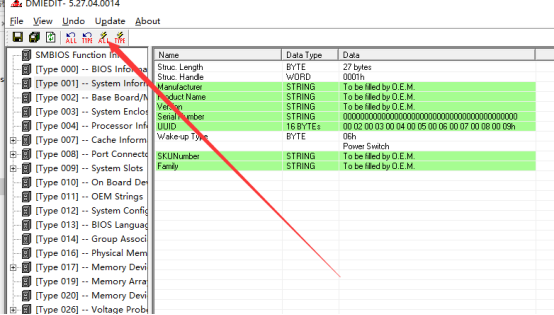
All dependent driver files must remain in the same directory; missing attachments will cause BIOS write failure. After opening the software, select [Type 001 -- System Information] from the left sidebar, then editable system parameters pop up on the right panel.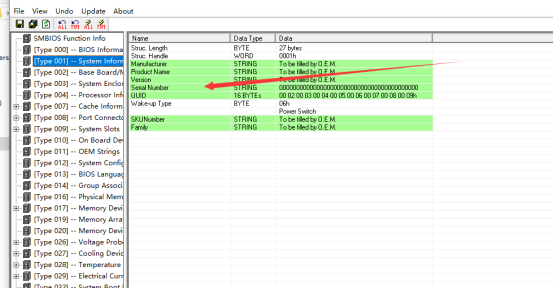
Second, customize OEM information: erase the default placeholder content under the highlighted SerialNumber field and input your exclusive device serial code. Modify the UUID value correspondingly as required, and users are also allowed to edit manufacturer name, product name and other branding details to meet personalized OEM demands.
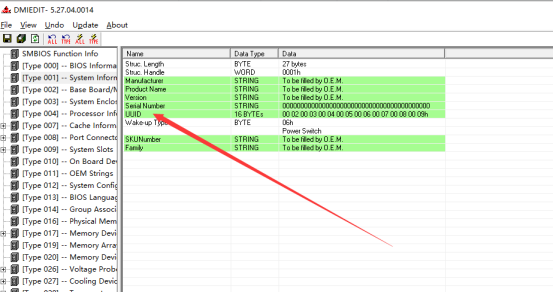
Third, save configurations to apply changes. Once all parameters are filled in, hit the save icon highlighted in the screenshot to flash new data into Mini PC’s BIOS chip. Never cut off power or close the program during saving to avoid irreversible BIOS corruption. Reboot the Mini PC afterward, and updated SN & UUID will be displayed within BIOS and Windows system info.
This modification is compatible with all EGLOBAL Intel & AMD Mini PCs equipped with AMI Aptio BIOS, widely applied for factory preset configuration of industrial controllers, digital signage and POS mini PCs without compromising hardware stability.
Contact: EGSMTPC
Phone: +86 13418881073
Tel: +86 13418881073
E-mail: coral@eglobaltech.cn
Add: 16D, QUANZHI Science & Technology Building, Maozhoushan Industrial Park, Hou Ting Community, Sha Jing Street, Bao'an District, Shenzhen, 518104 China