
}
The F11-N100 is a commercial mini pc powered by Intel 12th Gen Alder Lake N100 low-power processor. It targets lightweight office, industrial control, hotel, education, soft routing and home HTPC scenarios. Featuring compact chassis, dual Gigabit Ethernet ports, low power draw, dual 4K video output and comprehensive BIOS management, it serves as an optimal bulk procurement option for small and medium enterprises and institutions.
The system adopts an SOC single-chip architecture. Its Intel N100 CPU delivers 4 cores and 4 threads, with a base frequency of 0.8GHz and max boost frequency of 3.4GHz, 6W TDP and 6MB Intel Smart Cache. Integrated Intel UHD Graphics (24EUS, up to 750MHz) smoothly decodes 4K media for audio-visual playback and multi-screen office work. It comes with onboard 8GB LPDDR5 4800MHz memory for stable response. Storage expansion options include UFS2.1 (0/128GB/256GB optional), one M.2 2280 slot for SATA SSD and one SATA3.0 interface supporting 7mm 2.5-inch SSD with 6Gb/s bandwidth for flexible capacity upgrades.
Network: Dual Intel RTL8111H Gigabit RJ45 LAN ports, supporting PXE boot, WOL (Wake-on-LAN) and RTC wake-up, ideal for soft routers, call centers and centralized computer room management. Equipped with dual-band Wi-Fi (2.4G/5G 802.11b/g/n/ac) + Bluetooth 4.2 module with internal RF cables, enabling seamless switching between wired and wireless networks.
Video Output: Simultaneous dual-display via HDMI 2.0 and DP 1.4 ports, supporting 4K@60Hz output, perfectly matching multi-screen financial work, split advertising screens and light design tasks.
The ultra-compact chassis supports horizontal and vertical placement. A standard VESA bracket allows mounting the unit behind monitors to save desktop space. A built-in copper cooling fan ensures stable 7×24-hour continuous operation. It meets seismic standard 1.0Grms (5–500Hz per IEC60068-2-64), adapting to long-term stable operation in industrial environments. Low power consumption cuts long-term electricity costs compared with traditional tower desktops.
Compatible with Windows 10/11, Ubuntu and CentOS, satisfying system requirements of government, computer lab and industrial control applications. Standard package list: 1 × F11-N100 mini pc host, AC power adapter, power cord, screw kit, VESA mounting bracket, complimentary 2.5-inch SATA cables.
Corporate offices, e-commerce customer service, real estate agencies and government service windows
Education computer labs, training centers and library student terminals
Hotel room dedicated PCs and hospital information management workstations
Industrial control equipment, advertising players, POS terminals and multimedia playback hosts
Home living room HTPC, soft routers and remote monitoring storage devices
This model runs AMI Aptio BIOS Version 2.22.1287. Pressing the F11 key during boot is the core shortcut to enter the boot menu. Step-by-step operation and common function configurations are listed below.
Upon system startup and POST self-test, continuously press the keyboard F11 key to pop up the boot device selection window.
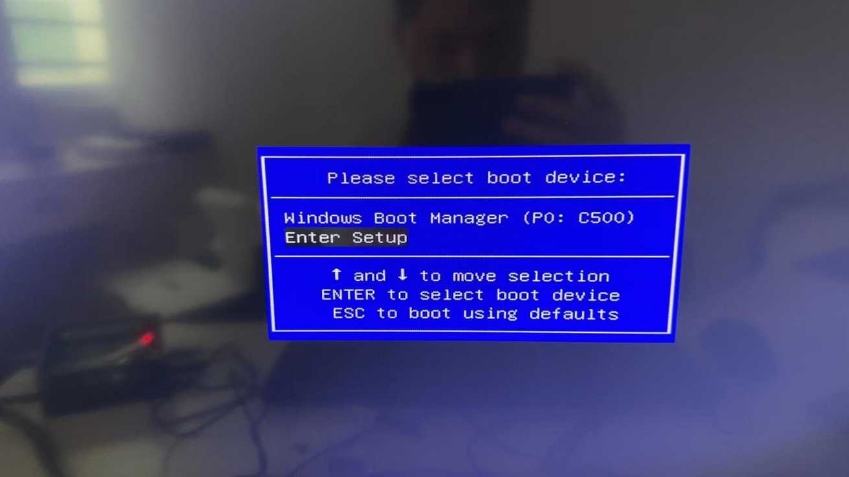
Use Up/Down arrow keys to select , then press Enter to enter the BIOS main interface.
Hotkey Functions: F9 – Restore optimized BIOS default settings; F10 – Save changes and exit; ESC – Discard changes and return; F1 – General help; +/- – Modify parameter options.
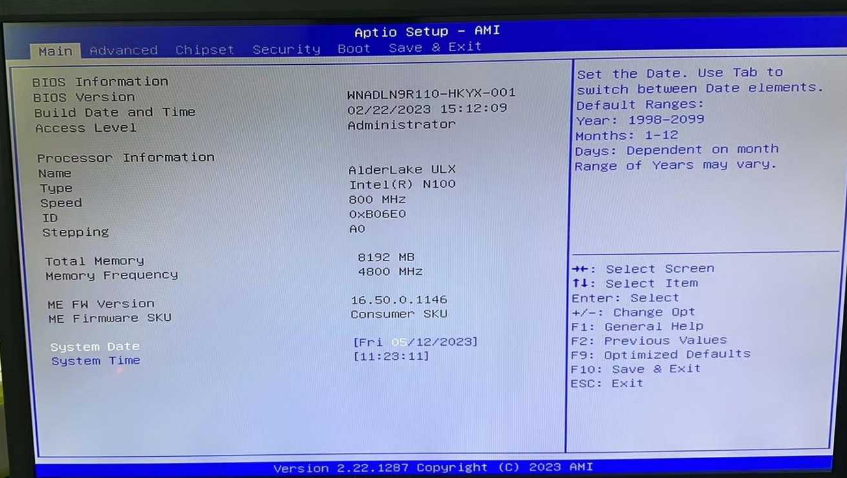
Use arrow keys to highlight system time or date fields and input new values via keyboard. Press Tab to switch between segments. Date format: Month/Day/Year; Time format: HH:MM:SS. Calibration here is required for RTC wake-up and scheduled power-on functions.
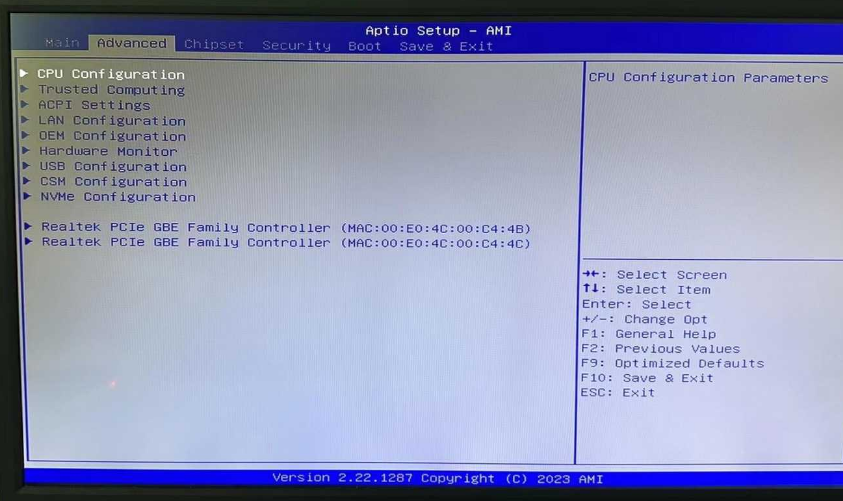
The left menu includes CPU Configuration, ACPI Settings, LAN Configuration, USB Configuration, OEM Configuration, Hardware Monitor and other submenus. Frequently used settings are detailed as follows:
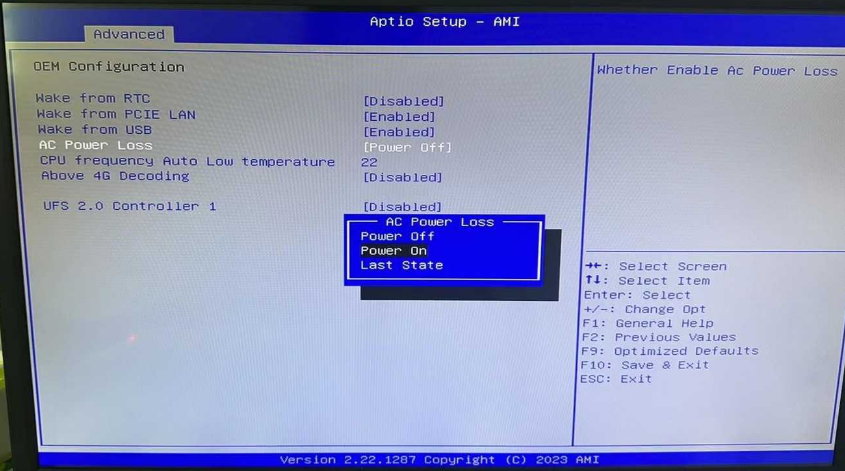
Path: Advanced → OEM Configuration → AC Power Loss
Power On: Automatically power on the unit once power is restored after an outage
Power Off: Remain powered off after power recovery (factory default)
Last State: Resume the power state before power failure Press F10 to save changes; settings take effect after power cycle.
Within the OEM Configuration page, users may enable or disable RTC wake-up, PCIE LAN wake-up and USB wake-up for remote maintenance and unified computer room power scheduling.
CPU Configuration displays processor parameters; LAN Configuration manages dual Gigabit Ethernet controllers; USB Configuration adjusts peripheral recognition rules; CSM Configuration resolves compatibility issues of legacy OS and bootable USB drives; NVMe Configuration manages solid-state drive boot priority.
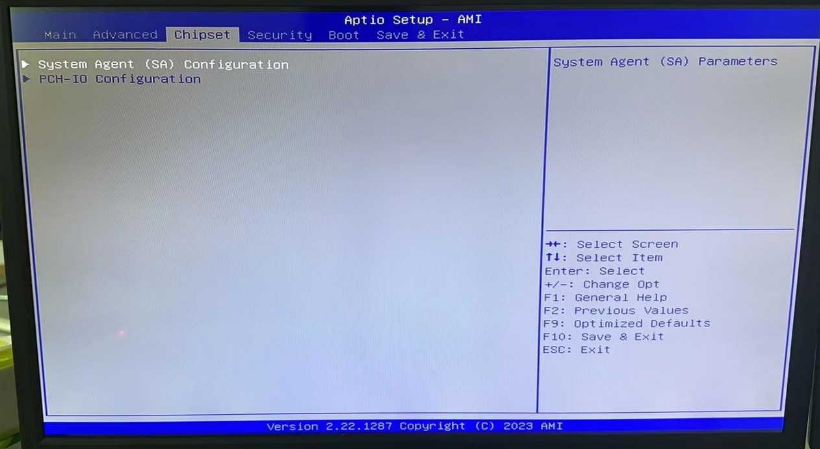
Two submenus are available: System Agent (SA) Parameters for multi-display allocation and PCH-IO Configuration for peripheral I/O resource assignment. Optimize hardware resource allocation here for multi-screen workstations and industrial extended peripherals.
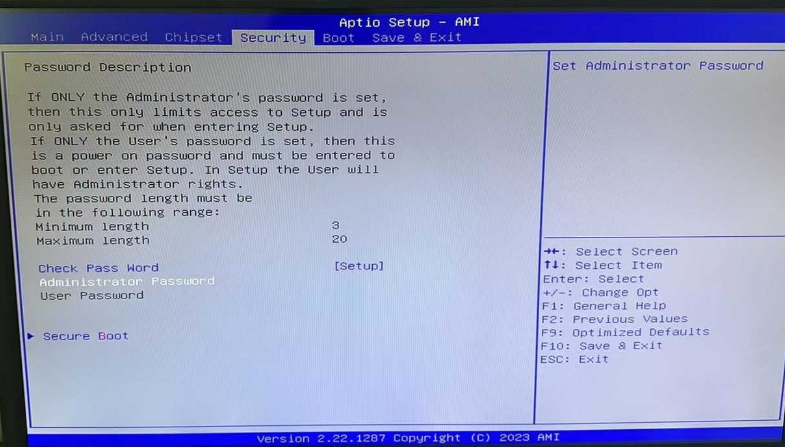
Two tiers of password protection are supported with a valid length range of 3–20 characters:
Administrator Password: Restricts access to BIOS setup only; system boot remains unaffected.
User Password: Triggers password verification at power-on and limits BIOS modification, suitable for computer labs to prevent unauthorized parameter alteration. Setup Path: Navigate to the Security tab, select the target password option and press Enter to create and confirm credentials. Secure Boot switch is also available for Windows secure boot compliance.
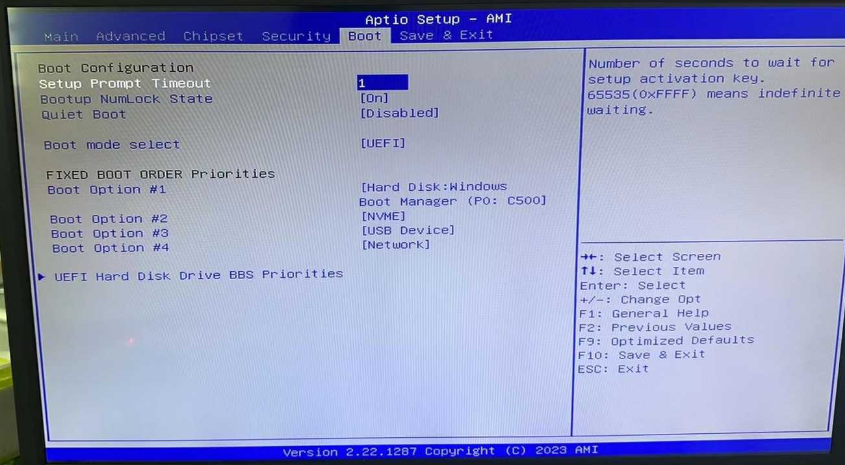
Adjust boot priority for hard drives, USB flash drives and Windows Boot Manager. Move USB or network devices to the top priority for OS reinstallation or PXE diskless boot. The Launch EFI Shell function is reserved for professional maintenance debugging.
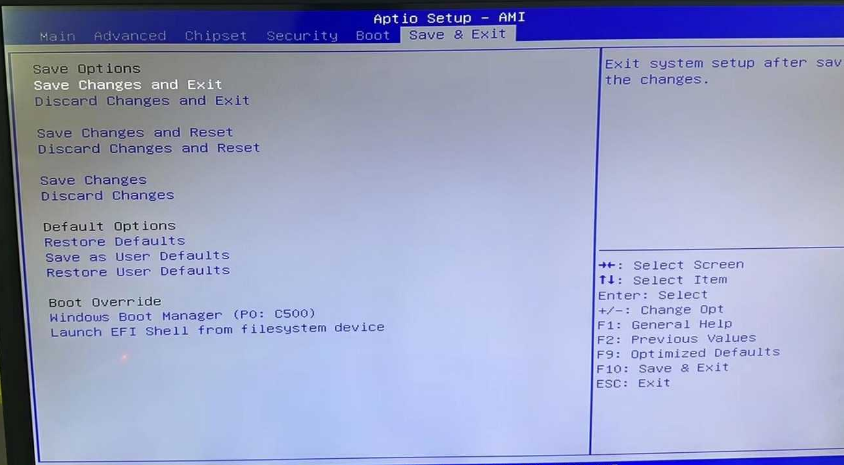
Full set of save/discard options are provided:
Save Changes and Exit: Save all modifications and reboot the mini pc
Discard Changes and Exit: Abandon unsaved configurations and exit BIOS
Restore Defaults: Recover factory-optimized BIOS parameters
Boot Override: Temporarily select a boot device for single boot without permanent priority modification After all adjustments, press F10 as a shortcut to save and exit for higher efficiency.
Equipped with the low-power N100 platform, the F11-N100 mini pc balances space efficiency, low energy consumption and commercial dual-network & multi-display demands, covering office, education, industrial and hotel scenarios. Its fully-featured AMI BIOS uses the F11 shortcut as the core entry, supporting auto power-on after power loss, remote wake-up, BIOS password lock and boot sequence adjustment for professional operation and maintenance. With outstanding performance in bulk deployment and long-term stable operation, it stands as a cost-effective lightweight commercial computing solution.
Contact: EGSMTPC
Phone: +86 13418881073
Tel: +86 13418881073
E-mail: coral@eglobaltech.cn
Add: 16D, QUANZHI Science & Technology Building, Maozhoushan Industrial Park, Hou Ting Community, Sha Jing Street, Bao'an District, Shenzhen, 518104 China