
}
As a high-performance mini pc launched by Eglobal Technology, the F11B2-5800H F11 mini pc stands out among all kinds of mini pc products for its powerful AMD processor and mature remote management features. Unlike entry-level mini pc models that only support basic office tasks, this F11 mini pc is built to handle heavy design work, multi-screen financial office, commercial playback and industrial control, and it carries native Wake-on-LAN (WOL) capability, which is a must-have function for teams that deploy dozens or hundreds of mini pc devices in offices, training centers and call centers.
This F11 mini pc adopts AMD Ryzen 7 5800H as its core computing chip. Made with 7nm manufacturing process, the CPU delivers 8 cores and 16 threads, with a base clock of 3.2GHz and peak boost frequency up to 4.4GHz, paired with a 16MB cache and 45W TDP. Integrated AMD Radeon Graphics inside the mini pc can decode 4K footage smoothly and drive dual-screen display simultaneously, which perfectly covers the visual output needs of most mini pc users. For memory expansion, the F11 mini pc reserves two DDR4 SO-DIMM slots, supporting up to 32GB RAM, enough for large file editing and multi-task running on the mini pc. On storage, dual M.2 slots (2242 and 2280) are fitted on this mini pc, allowing users to install two high-speed SSDs at the same time to boost the mini pc’s read and write speed. It runs AMI EFI BIOS, where users can adjust all network, power and boot settings of the mini pc freely.
Network performance is one of the core highlights of this F11 mini pc. It comes with an Intel Gigabit RJ45 Ethernet port with 10/100/1000Mbps auto-adaptation, and the mini pc supports WOL, PXE diskless boot and RTC scheduled wake-up out of the box. There is also an M.2 slot reserved for Wi-Fi & Bluetooth modules on the mini pc, with internal RF cables pre-installed, so users can add wireless connectivity to the mini pc as needed. The WOL function on the mini pc lets IT staff power on every offline mini pc remotely through the local area network, which saves massive time for daily maintenance of batch mini pc equipment.
Rich I/O ports are arranged on the compact body of the F11 mini pc. Two HDMI 2.0 ports support dual 4K@60Hz output, so the mini pc can connect two monitors at once without lag. For data transmission, the mini pc equips 2×USB3.2 Gen2, 1×USB3.2 Gen1, 1×USB2.0 and one Type-C port to connect external hard drives, drawing boards and other peripherals. A dedicated 3.5mm audio jack and DC 19V/5A power input port are also reserved on the mini pc. The whole mini pc chassis is made of ABS material, sized 116×106×37.5mm, small enough to save much desk space compared with traditional tower desktops. A smart silent fan takes charge of heat dissipation for the mini pc, supporting stable 24/7 continuous operation. The mini pc works normally at temperatures ranging from -20℃ to +60℃, so it can be placed in open office areas, industrial workshops and hotel rooms without unstable performance. This F11 mini pc fully supports Windows 10 and Windows 11, and the standard package includes the mini pc host, power adapter and power cord; Wi-Fi antennas, HDMI cables and user manuals can be purchased as optional accessories together with the mini pc.
This F11 mini pc fits a wide range of real-life scenarios. Design studios and financial teams rely on the mini pc’s dual-screen and high computing power; training schools and computer labs use the mini pc’s WOL function to manage all student mini pc units remotely; hotel rooms, real estate agencies and call centers deploy the mini pc for daily light office use; industrial control panels and advertising playback terminals also take this mini pc as their core host, thanks to its wide temperature tolerance and steady running performance.
For all users who need remote control of their F11 mini pc, WOL is the most practical built-in feature of this mini pc, and the following steps will walk you through the full setup process to activate remote wake-up on your mini pc.
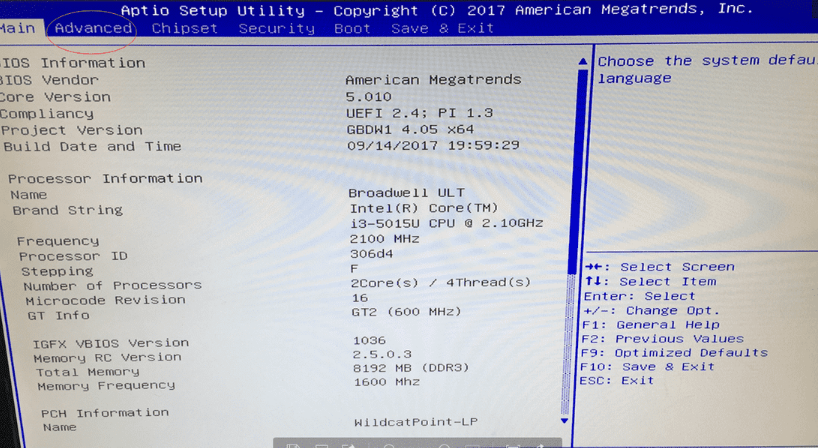
First, boot up your F11 mini pc, and press Del or F1 key right after powering on to enter the AMI Aptio BIOS interface of the mini pc. Move to the Advanced tab, find the LAN PXE Config option and enable it. At the bottom of this Advanced page, you can view the unique MAC address of the mini pc’s gigabit network controller—write down this MAC address, as it is the key identifier to send wake-up signals to the mini pc later.
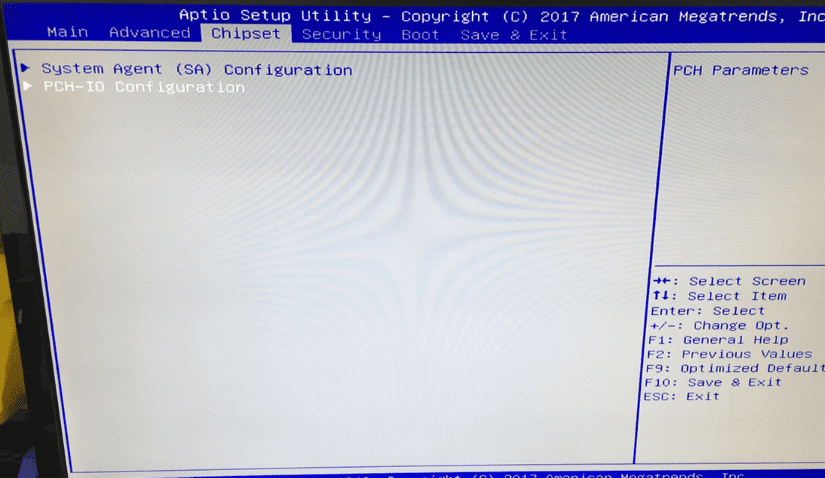
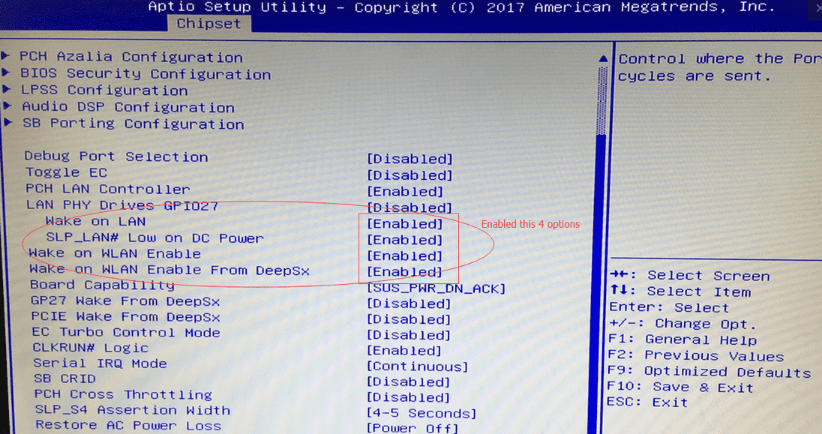
Next, switch to the Chipset tab to complete core WOL parameter settings for the mini pc. Open the PCH-IO Configuration submenu, then locate four WOL-related items and set all of them to Enabled: Wake on LAN, SLP_LAN# Low on DC Power, Wake on WLAN Enable, Wake-on-LAN Enable From DeepSx. These four options unlock the mini pc’s ability to receive magic packets when the mini pc is fully powered off. Do not modify other chipset options randomly, or the mini pc may face hardware compatibility faults.
After finishing all BIOS adjustments for the mini pc, hit the F10 shortcut to save all changes and exit the BIOS menu. The F11 mini pc will restart automatically, and all network wake-up configurations for the mini pc will take effect after reboot.
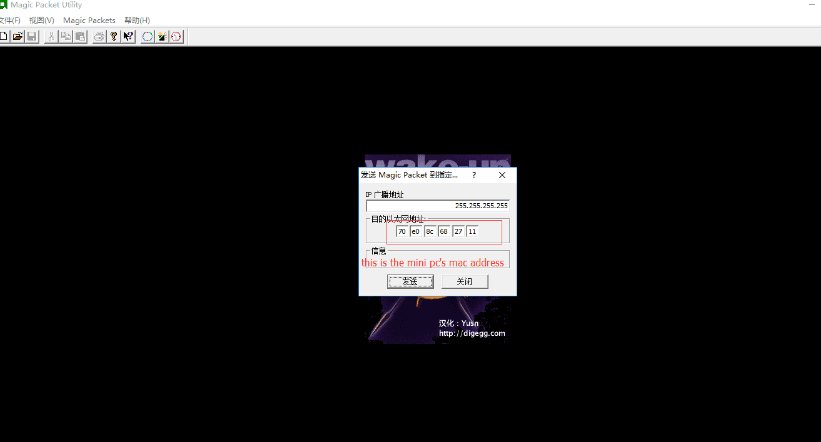
Once BIOS setup for the mini pc is done, prepare another computer in the same local area network and install Magic Packet Utility, a lightweight tool used to send wake-up signals to the mini pc. Launch this software, fill in the MAC address you copied from the mini pc’s BIOS page in the target MAC column, and keep the default broadcast IP 255.255.255.255. Click the Send button to transmit the magic packet, and your offline F11 mini pc will power on immediately after receiving the signal.
To sum up, the F11B2-5800H F11 mini pc balances powerful computing capacity, compact size and convenient remote management, making it a versatile mini pc for commercial and industrial deployment. The built-in WOL function of the mini pc can be activated quickly via simple BIOS tweaks, allowing administrators to remotely turn on every mini pc without physical contact. For enterprises and institutions equipped with multiple mini pc devices, this feature greatly cuts down daily maintenance workload and realizes unified remote control of all mini pc terminals.
Contact: EGSMTPC
Phone: +86 13418881073
Tel: +86 13418881073
E-mail: coral@eglobaltech.cn
Add: 16D, QUANZHI Science & Technology Building, Maozhoushan Industrial Park, Hou Ting Community, Sha Jing Street, Bao'an District, Shenzhen, 518104 China