
}
Security has become one of the most vital considerations when people select a mini PC, especially for users who plan to install the Windows 11 operating system. Trusted Platform Module, widely known as TPM, is an essential hardware‑based security component that protects your device, passwords and sensitive data against hacking risks.
It is quick and straightforward to check whether TPM has been activated on your mini PC. First, press the Windows key + R on your keyboard to launch the Run dialogue box. Next, enter tpm.msc in the input field and hit the Enter key. If TPM is supported and enabled on your mini PC, the TPM Management window will appear on your screen, just like shown in the screenshot.
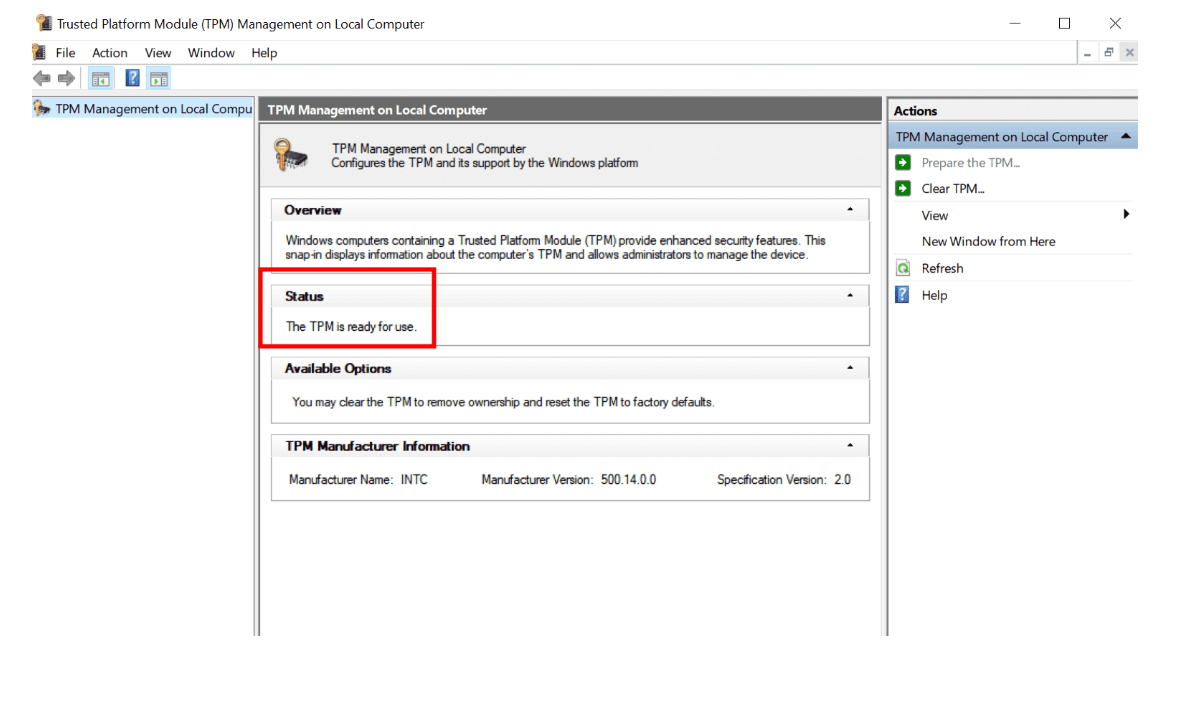
Inside this management panel, you can check the Status section directly. When you see the text The TPM is ready for use, it means TPM is successfully turned‑on and functioning normally. You can also view detailed manufacturer information, firmware version and specification version. As seen in the picture, this mini PC carries TPM 2.0, which meets the official security requirement for Windows 11 installation.
If no TPM management window pops up after running the command, your mini PC may lack a TPM chip, or the function has not been switched on inside the BIOS menu. In that case, you can restart your mini PC, enter BIOS settings, and look for options labelled TPM, Security Chip or Firmware TPM to activate this feature manually.
For mini‑pc buyers, confirming TPM‑2.0 availability before purchase avoids later‑stage system‑installation troubles. A mini PC equipped with active TPM‑2.0 delivers much‑improved data encryption, identity protection and system security, making it a reliable choice for home‑office work, business tasks and daily computing.
Contact: EGSMTPC
Phone: +86 13418881073
Tel: +86 13418881073
E-mail: coral@eglobaltech.cn
Add: 16D, QUANZHI Science & Technology Building, Maozhoushan Industrial Park, Hou Ting Community, Sha Jing Street, Bao'an District, Shenzhen, 518104 China